Cycling Events and Bike Trail Articles Delay – Leg Injury

This is the time of year when I am usually out blazing new bike trails and taking photos (and even videos sometimes) but if you are wondering why I haven’t been posting new trail pages and photos recently it is because I am currently on the Disabled List. 🙁

I have had leg injury that I have had for months now but seemed to be in remission. Well, it acted up again and I have been unable to ride (and even having a hard time walking) for the last few weeks now (since just after Easter weekend). It is driving me crazy to be missing out on all this good riding weather! Actually April has been a little chilly (March was better this year) but it is still quite acceptable riding weather.

Anyway, as for the injury, I am off to the chiropractor this afternoon. I am hoping that he can perform some of his voodoo and speed up the recovery time a little.

Door County Dentury Ride

Door County Century Ride

The other thing that I wanted to mention today is that I just updated my Cycling Events Calendar Page with a new ride that I just heard about from a contact that I have at Livestrong who I just discovered is also a pretty major cyclist.

The ride that I just heard about is the Door County Century Ride which takes place this year on 9/9/12. Although, I am not really into a lot of organized rides myself, this one sounds very interesting to me. I like that there is no formal start time (they suggest between 6:30am and 10am) and you can do the full Century or they have routes for 28.5, 50 and 70 mile rides. The ride is not until September but registration is open and there is a link to the website on the Cycling Events Calendar page.

I have also rearranged the Cycling Events Calendar page so that the events that are coming up first are at the top of the page. Initially I did not have many events or rides out on this page so it really didn’t matter but as I add more this makes a lot more sense.

As I was rearranging this page I noticed that the Bike The Drive event is coming up next. This is the ride where they close down Lake Shore Drive in Chicago to cars and trucks and open it up for cyclist for a few hours in the morning. So if you are considering doing this ride this year it is coming up soon!

I have always wanted to do this ride myself but it is always so early in the morning (yawn) that that kind of discouraged me. Maybe this year… Just maybe ~ well, I have to get my leg back first anyway.

Garmin Edge 800 Bicycle GPS Review

Now that I have had my Garmin Edge 800 GPS Bike Computer for over a month now, have purchased and tested 3 different GPS mapping software packages and the heart-rate monitor, have tried out a majority of the features and tested this thing on numerous bike rides, I have completed the Garmin Edge 800 Review as promised in an earlier post.

Garmin Edge 800 Gpe Enabled Bike Computer

Garmin Edge 800 Bike GPS Review

I tried hard to keep my review of the Edge 800 at a fairly high level and not get too involved in all of the little nitty-gritty details but in the end it ended up getting much more detailed than I was shooting for. It’s just hard to cover something like that in a few paragraphs and have anything meaningful to say.

Well for better or worse (for longer or shorter) it is done!

You can see the full Garmin Edge 800 Bike BPS Review HERE.

I included some basic information on the Edge 800 and a brief summary of some of the best features before actually getting into my own review of the product.

I’m not going to repeat the information on the review page here but one little hint that I thought was worth repeating here is what I called the “Baggie Technique/Hint“.  I mentioned this in the Edge 800 review and I actually used this technique on my Green Bay Bike Trail ride (described below).

Basically I keep some cellophane baggies and rubber bands (mostly for my electronics) in my bike bag in case it starts to rain while I am out riding. It actually did start to rain while I was out on the Green Bay Trail last week and I stopped and put my camera in the large baggie (then in my bike bag) and covered the Edge 800 and my other Bike Computer with 2 more baggies.

This actually works great. It keeps the electronics dry and they still work and you can still use them on your ride. Most of these devices say that they are water resistant but I still like to play it safe when it comes to my bike electronics and rain.

Green Bay Bike Trail Ride and Photos

This past Sunday (Easter Sunday) I was in Winnetka and had an opportunity to ride the Green Bay Trail and get some new photos. I have ridden the entire Green Bay Trail ~ and even the connecting Robert McClory Trail ~ in the past and the GBT is a really beautiful and scenic bike route so I did not want to pass up the opportunity to ride this trail again.

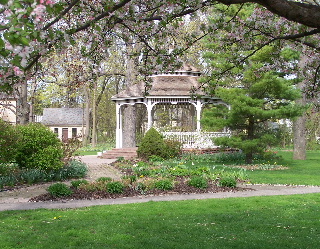
The Gazebo at the Henry J Kalk Park along the Green Bay Trail

The Gazebo at the Henry J Kalk Park along the GBT in Glencoe

I also had a batch of photos of the southern end of the Green Bay Trail (from Glencoe south to Wilmette) that I had lost (!) so I did not have photos of the southern part of the bike trail posted ~ until yesterday that is!

It was a beautiful day on Sunday (a little chilly but still nice) and on the first part of my ride I felt like I was in the Easter Parade! 🙂 There were a lot of people out on the trail ~ riding, walking, jogging ~ in the mid-afternoon.

I started my ride in Winnetka but headed south to the southern end of the trail ~ in Wilmette ~ so I could ride the entire trail. I stopped a lot on my way north for photos (for this site). It is always great to have the photos but it is not nearly as nice, as far as the bike ride goes, to stop all the time for the photos (although I do like taking the photos too).

I rode the entire GBT ~ through Wilmette, Kenilworth, Winnetka, Glencoe, and Highland Park ~ and a little bit of the southern part of the Robert McClory Trail up to Highwood. I stopped at Central Park, in Highland Park ~ on Lake Michigan ~ for a short break and a beautiful view of the lake. Then for the ride back, I just rode (no photos) and it was a really nice ride.

I have had the Green Bay Trail page and photos on this bike site since 2005 but, as I mentioned above, I was missing the southern section (south of Glencoe). Yesterday, I did some updates to the original Green Bay Trail page Here , have added a few photos to the original batch and have added 3 new photo pages of the GBT starting with Green Bay Trail Photo Page 7 (including page 8 and 9).

Back in 2007 I had one of the GBT photos featured in an article in the North Shore Magazine (that photo is on the top of Photo Page 5). I actually think that this round of photos is much better so I maybe if I get lucky I can get another one published in hard-copy form. 🙂

Anyway, the GBT is still a really nice bike trail and an excellent ride. There are also some nice places to head a few blocks east out to Lake Michigan for some excellent scenery. At the time of my ride there was no construction or detours on the trail so it is wide open this year.

For those of you who live in the Chicagoland area (or will be visiting here) I hope you can get out to the GBT at some point.

Good Information on Exercise for Cancer Patients

I had a request recently to post an article on our website related to exercise reducing fatigue for cancer patients. I received the article yesterday and it is a good article with some nice references so I have posted this article on our site.

I actually do believe that exercise ~ like cycling ~ is an excellent way to reduce fatigue for anyone so I’m sure that it would have great benefits for cancer patients whenever that is possible.

I had some more thoughts on this but rather than ramble on myself I would rather just direct you to the article that was submitted to our site. You can find the article “Exercise Lessens Fatigue for Cancer Patients” ~ Here.

This article was contributed by David Haas, Mesothelioma Cancer Alliance.

Bridge Out McHenry Co. Prairie Trail North of Fox River and FRT

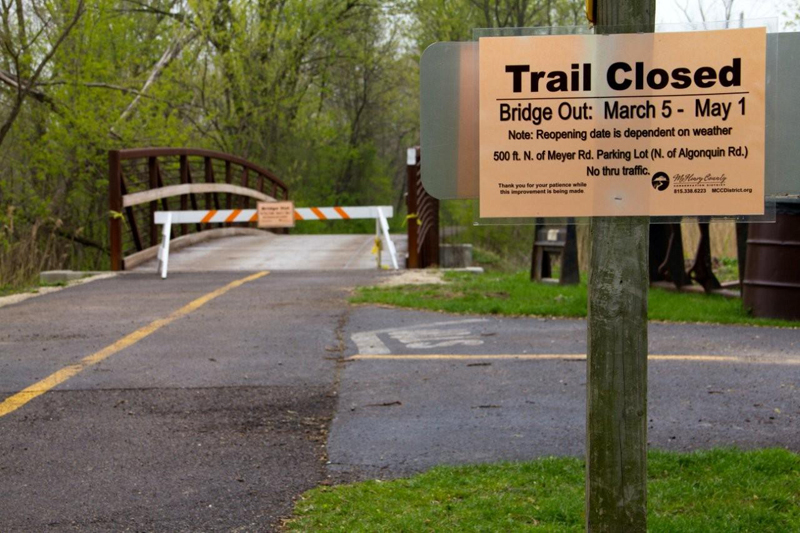
I was just informed a few days ago that there is a bridge out on the McHenry County Prairie Trail just north of where you cross the Fox River and Route 31 in Algonquin. This is kind of a bummer for those of us who like to ride the northern part of the Fox River Trail then connect to the Prairie Trail and continue north.

Bridge Out Sign on Prairie Trail

Bridge Out Sign on Prairie Trail with Expected Completion Date

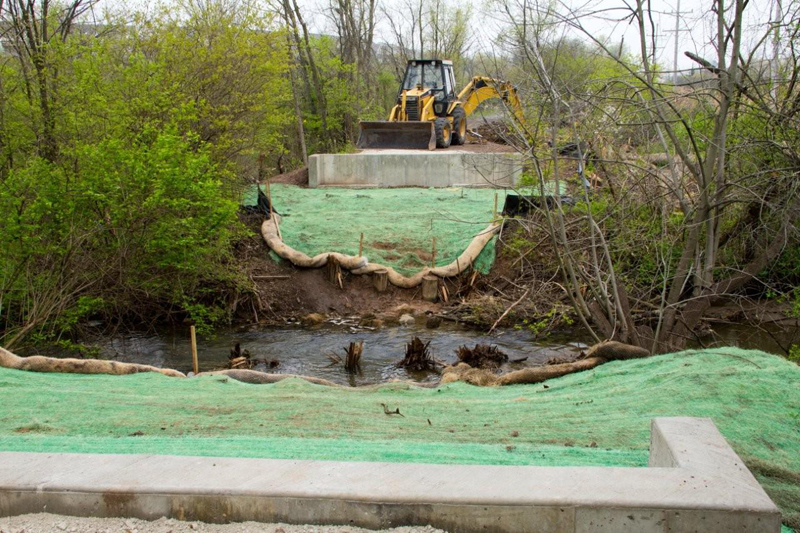
It doesn’t look like it would be easy (or maybe not even possible) to cross the tributary where the bridge is out. I was looking at this area on Google Maps and it looks like there could be a way around this but it might be tricky for those of us who are not real familiar with the area and the local roads.

The bridge is supposed to be back around May 1st but there is a lot of good riding time between now and then so I may actually head up there to check this out and see if there is a way around the missing bridge (like the famous Led Zeppelin line “has anyone seen the bridge?!?”)

Anyway, if anyone out there already knows a way around this please post a reply or send me an email.

The photos on this blog post are compliments of Dale Kiffel.

Bridge Out on Prairie Trail

Bridge Out on Prairie Trail

Digitize Your Ride ~ With Garmin Edge 800 Bike Computer

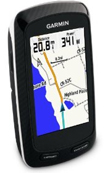
Garmin Edge 800 Bike Computer

Garmin Edge 800 Bike Computer

I’ve been giving my new Garmin Edge 800 GPS Bike Computer quite a workout and review lately and I gotta admit, I really love this thing! As I mentioned in an earlier post, I am a little bit of a techno geek anyway and, of course, I love to ride. Bike GPS computers (like the Edge 800) are perfect for people with this combination of traits.

As I mentioned in my last post, I have just purchased the additional maps for my unit (City Navigator, TOPO Maps and Rails-to-Trails). Well, I have received, loaded and used all of these products now and I’ll give you my first impressions of these software products after a brief review of some of the new things that I have been discovering on the Edge 800 and some of the things that I really like about this GPS  unit.

First of all, I really like the touch-screen. I almost always swipe the screen to switch between windows and almost never use the arrows on the screen. I have also used this with gloves on it it works great (actually maybe even better than with no gloves on).

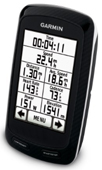
One of the other features that is also really great is the programmable screens on this unit. It is really easy to change the windows that are displayed on each screen and it’s great to be able to arrange them in almost anyway that you like (some screens have some limitations but most are pretty flexible) in addition to being able to select which screens are even displayed or not. You can include up to 10 windows on most screens (the photo above shows 8).

When you have made up your mind and decide to upgrade to a GPS enabled Bike Computer, we have included some good information and online resources Here on our Bicycle GPS page.

Today I just discovered the window that displays “Grade” and gives you the percentage up or down grade that you are on at anytime (there seems to be a very slight delay as to when the grade is displayed but that is not really a problem).

I was also paying attention to the total ascent and total decent windows. It’s nice to know how much of your ride has been uphill and how much has been downhill. They are close to the same at the end of a round trip ride (although there are some minor variances). Unfortunately, the unit does not come with both the ascent and descent windows on the same screen with the default settings. Of course, that’s not a problem because you can just program one of the screens to include both (which I am going to do before my next ride).

The upload and download features of the Edge 800 are really nice too, of course. The Training Center Software is pretty basic and it would be nice if that gave you a little more but the Garmin Connect site and software is loaded with features.

Finally, the MicroSD slot for loading additional maps is great. This is one of the reasons that you pay more for the Edge then for the lower priced models but IMO it is well worth it. The Base Map that the units come with is pretty limited (very few smaller side roads and no bikes trails (that I’ve seen)) so it is nice to be able to include additional maps.

Which brings me nicely into my last topic that I referred to above:

Garmin Bike GPS Mapping Software

I’ll start with the least expensive GPS maps that I have recently purchased which is the Rails-to-Trails maps. This is actually a nice addition to the TOPO or City Navigator maps (described below), can be used at the same time as the other maps (when you select the download) and it only costs $10. The Rails-to-Trails software is for a smaller area so you’ll need to select the correct map for your region (I have the Northeast version). These maps do not include ALL the trails in a particular area but it does have most of them (even some smaller, lesser known trails).

The next mapping package that I used was the TOPO Maps. Actually I really didn’t think that I would use this particular mapping package that much but now that I have it it just may be the primary mapping software that I use. This package does include plenty of bike trails and it also includes small side streets and subdivision streets as well as having the points-of-interest to reference.

The last mapping software package that I received was the City Navigator software. It’s actually redundant (to have both the TOPO and City Navigator software)  because you can only use either the TOPO card or City Navigator card in the unit at any one time.  It might be nice to have both once in a while but you really should probably decide which one of these mapping products suits you the best and just select one of them.

The City Navigator package includes all of North America (the version that I bought) where the TOPO software is limited to a smaller area (I have the Great Lakes version which includes the Chicago area where I live).  City Navigator has more points-of-interest than the TOPO package but the TOPO maps do include many of the important POIs. City Navigator does include some bike trails but it does not seem to be  nearly as extensive or detailed as the TOPO package.

On my ride today, I was just thinking about this vast amount of ride data that I now have (speeds, averages, distances, elevations, maps, heart-rate, lap info, ascents, descents…) and how my whole ride has been digitized for me enjoy and review later if I like (which I usually do).

That’s about it for the latest Bike GPS updates for now. These things really are a lot of fun. Check out Bicycle GPS for some good info and resources if you are considering getting one of these units.